
CephFS vs Host Disk Performance for Kubernetes run PostgreSQL Citus Cluster on Budget Friendly VM Cluster
Is it possible to build a budget-friendly Kubernetes cluster with a fault tolerant filesystem powering a PostgreSQL cluster for an early stage SaaS startup?

CephFS vs Host Storage: A Performance Deep Dive
I originally posted about the SaaS build-out I’m working on over on Reddit. You can read that post here:
https://www.reddit.com/r/buildinpublic/comments/1o3vrpy/saas_infrastructure_buildout/
This is a follow-up on that where I explore the performance difference between CephFS and the host disk in terms of file reading and writing throughput and IOPS under various conditions.
Why This Matters
I’m building a multi-tenant SaaS platform, part of which is built on Kubernetes with Citus (distributed PostgreSQL) as the database. The question I needed to answer was simple but critical: should I use CephFS distributed storage or stick with local host disks?
Technically, I’m building multiple SaaS projects. These include:
Backbuild AI: An AI orchestration system designed to run coding tools like Claude Code, Codex, Gemini CLI, Auggie, and more 24/7 through spec-driven development. It includes things like the ability to define specs and automatically break them down into tasks which are aligned with the codebase, add context to the tasks, perform security audits, escalate issues for human review and intervention when needed, etc.
FictionMaker AI: An AI-assisted creative writing tool. It lets you build entities like characters, locations, kingdoms, regions, unique objects, or even things like series, books, episodes, chapters, scenes, etc, and use AI assistance in outlining, organization, brainstorming, consistency checking, or even prose writing. The AI can even power the interface for you so you can just chat with it to get things done. It can help you make publishable books, audiobooks, video series, training content, and more.
ZootPro: A B2B tool in the real-estate space to empower brokerages and real-estate agents to do their job more effectively and efficiently.
These projects require a robust and scalable database system to power them. That is the primary topic of concern driving this infrastructure build-out.
CephFS offers some compelling advantages. It provides distributed storage with built-in replication, meaning my data is automatically copied across multiple nodes. If a node fails, the data is still available. It also allows any pod to access the same data from any node in the cluster, which is great for flexibility.
Unfortunately, distributed storage systems add network overhead and complexity, which can really tank performance. Every read and write has to go through the network to reach the storage nodes. Now, I’m not some big corporation who can fork out piles of cash for 500 Gbps+ links between my nodes. I’m trying to build a fault tolerant and scalable cluster on what is essentially a hobo’s budget to the business world. The real question was whether this network overhead would kill database performance.
The Test Setup
I built a custom benchmarking tool to measure real-world performance. The tests ran on a Kubernetes cluster with 3 control-plane nodes and 7 worker nodes, all running on budget VPS instances with NVMe SSDs.
For CephFS, I configured 3x replication, meaning every piece of data is stored on three different nodes. This provides good redundancy but also means more network traffic for writes.
The benchmarks measured several key metrics:
Sequential throughput: How fast can we read or write large files sequentially?
Random IOPS: How many random small reads or writes can we do per second?
Concurrent operations: How well does performance scale with multiple simultaneous operations?
Block size variations: How does performance change with different read/write sizes?
All tests used O_DIRECT I/O to bypass the operating system’s page cache. This was critical because without it, I was measuring RAM speed instead of disk speed. My early tests showed 10,000+ MB/s throughput, which was clearly wrong for disk I/O. I cannot tell you the level of frustration it was to figure out how to get the direct I/O working. However, after 20+ attempts at various things and lots of lessons on what *doesn’t work* for direct I/O on Linux, I finally got it working. After implementing proper O_DIRECT support using the `directio` Python library, the numbers dropped to realistic disk speeds of 100-800 MB/s.
The Results: Host Storage Dominates Reads
The performance difference between host storage and CephFS was dramatic for read operations.
Sequential Read Performance:
Host storage: 1,200 - 1,600 MB/s
CephFS (1 node): 120 MB/s
Host is 10x - 13x faster
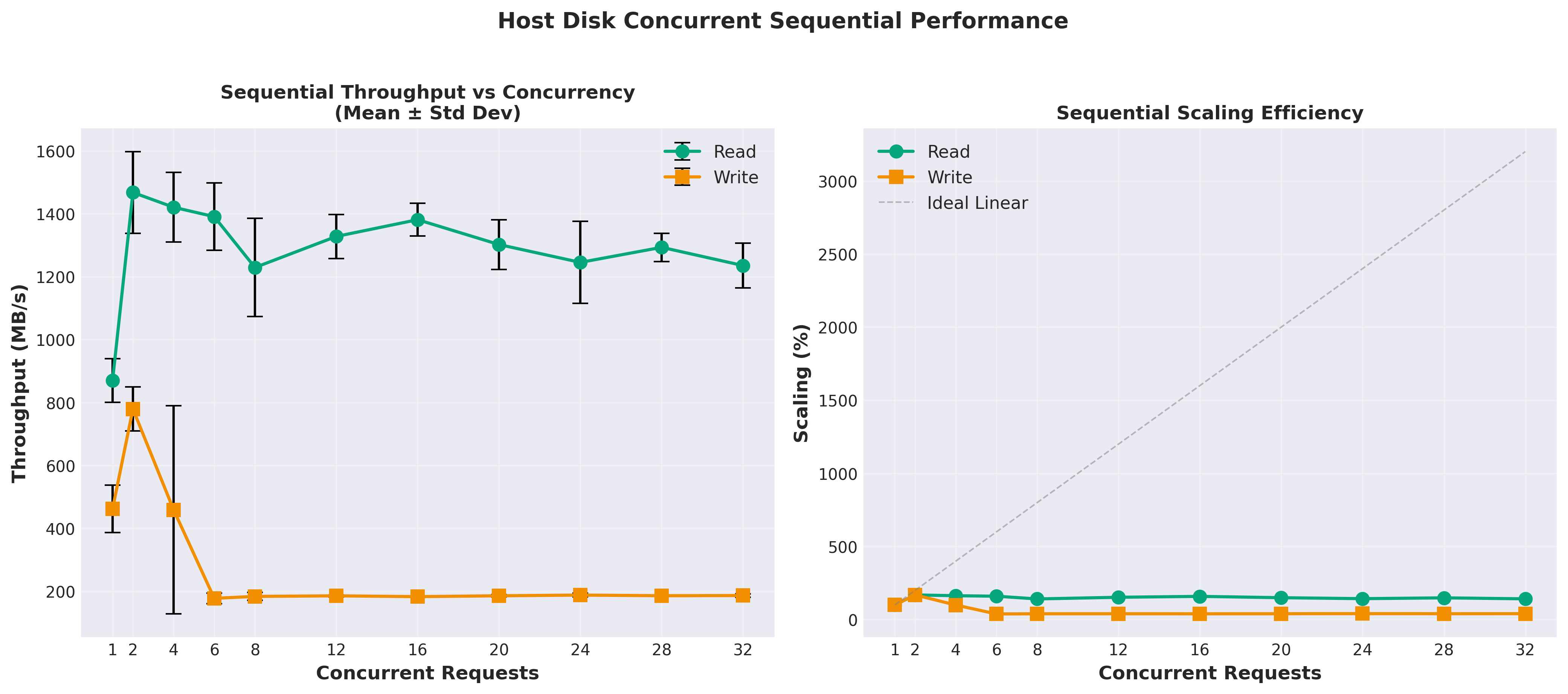

That’s not a typo. The local NVMe SSD delivered over 1.3 GB/s of sequential read throughput, while CephFS managed only 80 MB/s. The network overhead and distributed nature of CephFS created a massive bottleneck for reads.
Random Read Performance:
Host storage: 9,130 IOPS
CephFS (1 node): 616 IOPS
Host is 14.8x faster
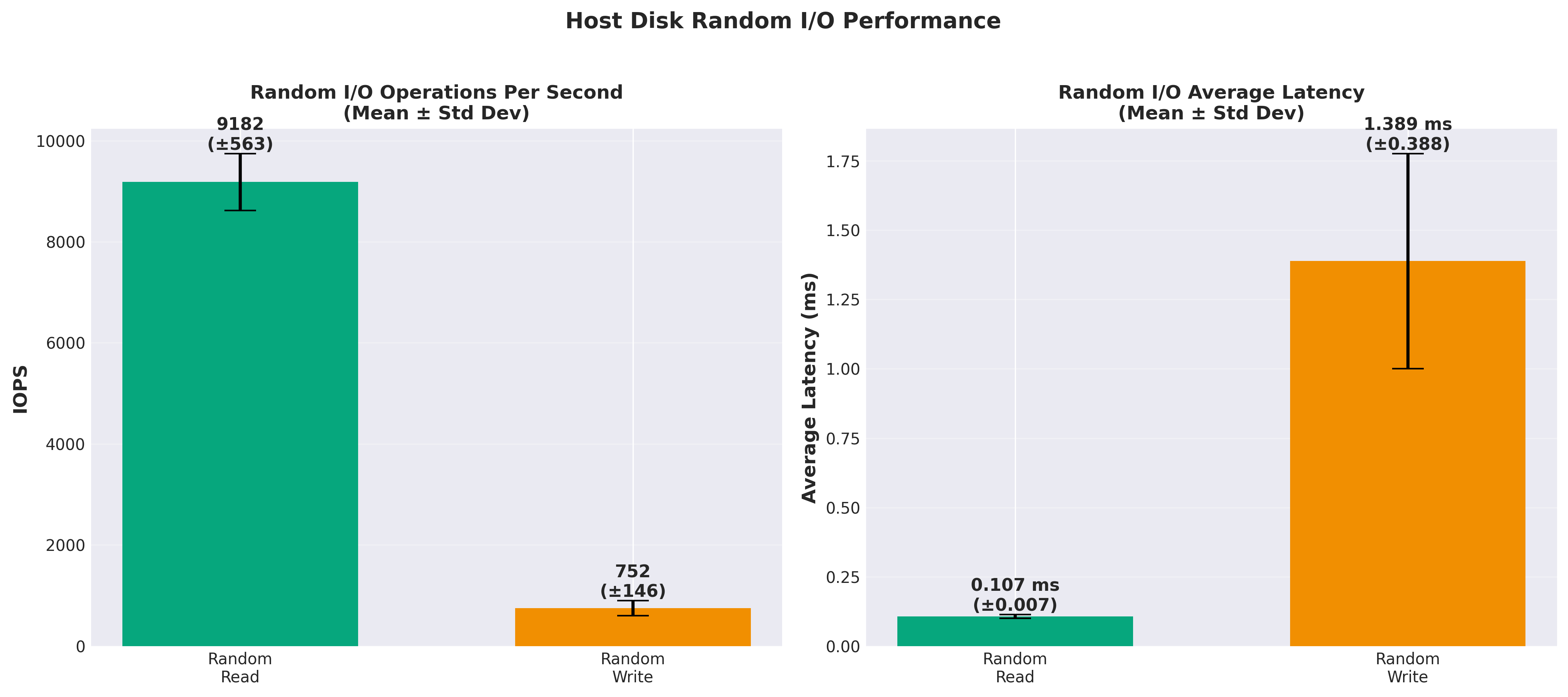
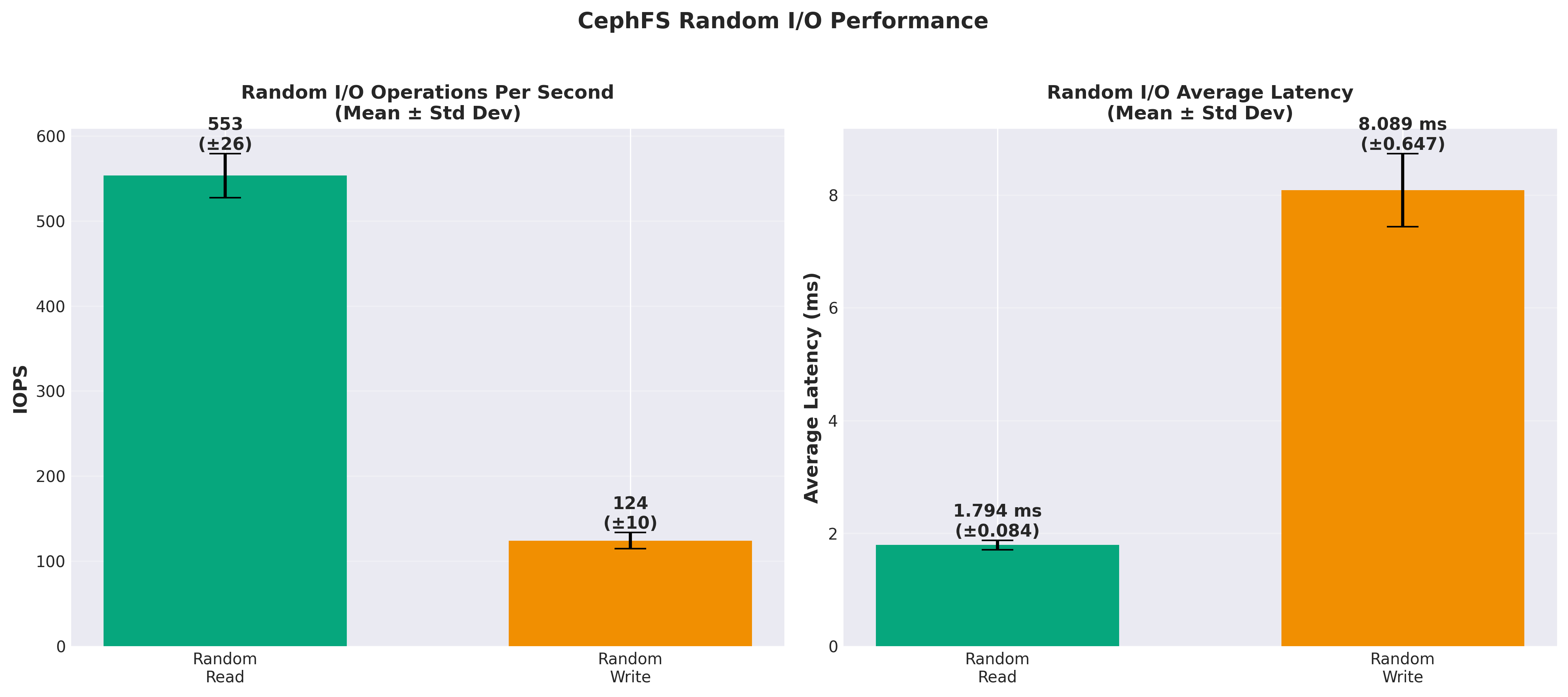
Random reads showed a similar pattern. The host disk could handle over 9,000 random read operations per second, while CephFS struggled to break 700 IOPS. For a database workload that’s heavily read-oriented, this might normally be a deal-breaker. However, Citus is a distributed database that shards data across multiple nodes. In a Citus cluster, reads are typically localized to a single node rather than accessing data across the network. This means the random read performance of the underlying storage is less critical. If I have a single client requiring that level of performance, it would be a non-starter, but using a message bus architecture with local caching of data both in the UI and in the API system, the database itself doesn’t need to be as performant. Further, with hundreds of clients, that load is spread across the 7 worker nodes, so it’s effectively 616 IOPS * 7 = 4,312 IOPS. That’s still not great, but it’s a lot better than 616 IOPS, and it’s redundant.
The Surprise: Writes
Here’s where things get interesting.
Sequential Write Performance:
Host storage: 775 - 850 MB/s
CephFS (1 node): 95 MB/s
Random Write Performance:
Host storage: 752 +/- 146 IOPS
CephFS (1 node): 124 +/- 10 IOPS
Host is 6.25x faster
Sequential writes for the host maxed out at 2 concurrent writes. But CephFS write performance scaled with concurrency up to the max tested of 32 concurrent writes. It climbed from around 23 MB/s at 1 concurrent write to around 95 MB/s at 32 concurrent writes. I wasn’t expecting to see that. I also didn’t expect to see more than 2 concurrent writes on the host disk cause such a performance degredation. However, this was consistently reproduceable with every test I ran.
While random reads are different by a factor of roughly 15x, the random writes showed less of a gap, with host storage being about 6x faster. But this is still much closer than the 15x difference we saw with reads.
Why The Asymmetry?
The dramatic difference between read and write performance tells us something important about how CephFS works.
For writes, CephFS has to send data across the network to three different nodes (3x replication). You’d expect this to be slow. But modern networks are fast, and CephFS can pipeline writes efficiently. The write doesn’t have to wait for all three copies to be confirmed before returning, so the latency isn’t as bad as you might think.
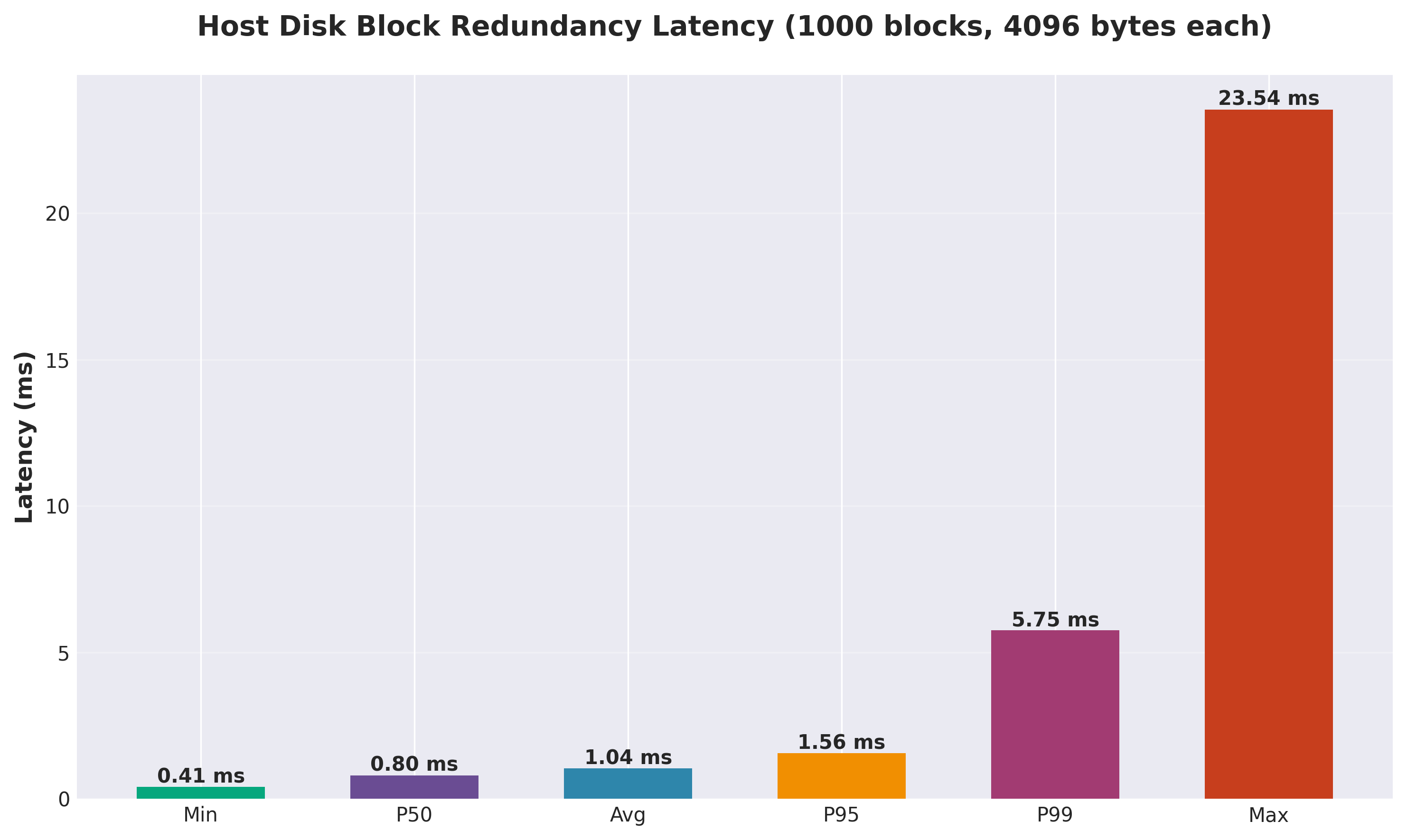
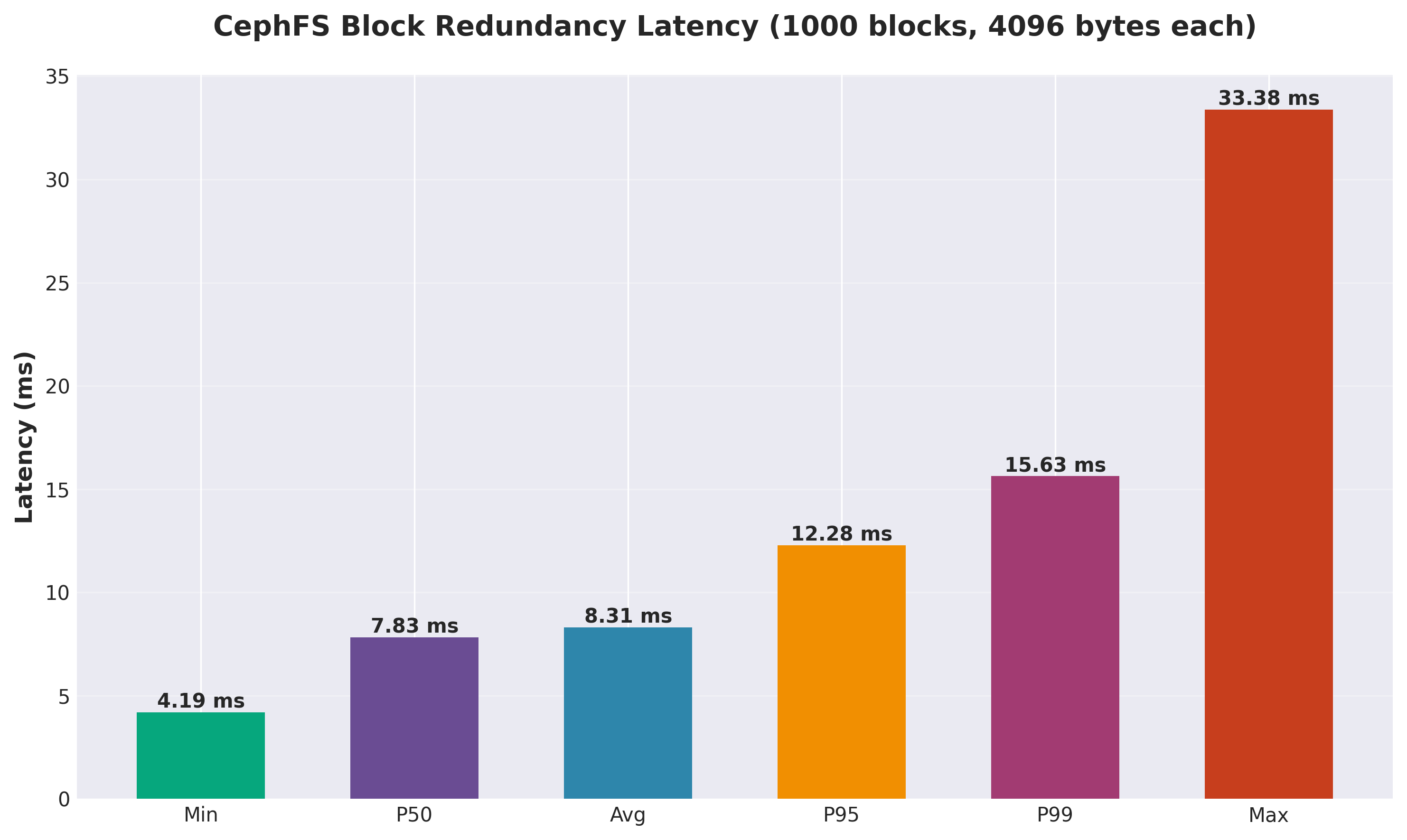
For reads, the story is different. Even though CephFS only needs to read from one replica, it still has to go through the network layer, the CephFS client, the metadata server, and finally to the storage node. Each of these layers adds latency. When you’re doing thousands of small random reads per second, these latencies add up quickly and account for the dramatic difference in performance. All those layers just aren’t there for the direct-to-host-disk path. You can see it in the above chart where it’s writing 1,000 blocks of 4KiB: there is dramatically lower latency vs over the network via CephFS.
The local NVMe SSD has a direct path to the data. No network, no distributed coordination, just raw SSD performance. Modern NVMe drives can deliver sub-millisecond latencies and massive throughput.
The Concurrent Operations Problem
I also tested how performance scaled with concurrent operations. This is important for database workloads where you might have dozens or hundreds of queries running simultaneously.
Initially, I hit a major bug in my testing. Concurrent write tests were using the O_SYNC flag, which forces each write to wait for disk confirmation before proceeding. This completely killed concurrent performance. Writes actually got *slower* as I added more threads.
After removing O_SYNC and adding an fsync() call at the end instead, concurrent writes started scaling properly. Performance increased with more threads up to a saturation point, then plateaued. This is the expected behavior for SSDs.
The lesson here: when benchmarking, make sure you’re testing what you think you’re testing. A single flag can completely change the results.
Multi-Node Scaling: Not What I Expected
One of the promises of distributed storage is that adding more nodes should improve performance. More nodes means more aggregate bandwidth and IOPS, right?
The results were mixed. Looking at per-node CephFS performance across concurrent operations spread over different node counts:
1 node: 80 MB/s sequential read, 616 IOPS random read
3 nodes: 85 MB/s sequential read, 336 IOPS random read
5 nodes: 56 MB/s sequential read, 428 IOPS random read
6 nodes: 51 MB/s sequential read, 497 IOPS random read
Performance didn’t scale linearly. In fact, it often got *worse* with more nodes actively being used. This suggests that coordination overhead and network contention become bottlenecks as you scale up.
This makes sense when you think about it. Each additional node adds more network traffic, more metadata operations, and more coordination between nodes. For small operations, this overhead can outweigh the benefits of distributed I/O.
Now, keep in mind that I’m running a set of 10 budget VMs which just use a virtualized 1 Gbps private network link to each other. Things would look very different with a proper bare metal cluster with low-latency interconnects. However, even in that scenario, the network overhead of CephFS is unlikely to disappear completely.
The Case for CephFS
For my use case -- a Citus database cluster -- the case for CephFS is strong. Raw throughput is not as important on this production database system for my startup SaaS as fault tolerance and availability. In order to grow, I need to keep the system online and stable and problem free. If I suffer an issue with a VM, I need it to not take down my entire database. If I lose my database, my SaaS is dead in the water, my clients are unhappy, and I either need to fork out money to ameliorate the damage or lose clients and revenue. I can’t afford those options at this stage of the game (or really any stage of the game), so fault tolerance is paramount. Additionally, my VMs will need to run more on the Kubernetes cluster than just the database, and I need redundant block storage for those operations, as well.
Now, Citus can handle data replication and distribution at the database level. So I may not need to put the database on CephFS. I could just use host storage and rely on Citus’s built-in replication and distribution. However, some challenges arise in managing Coordinator node failures, metadata, and cases where I might need to isolate a larger tenant to their own node. In those cases, CephFS provides a convenient and redundant storage solution which removes some of the headache from the process and helps further ensure data reliability and easy recovery from failures.
Once I am able to scale out to a larger node count and upgrade host systems and network interconnects, I could even explore combining CephFS’s redundancy capabilities with Citus capabilities and multi-datacenter replication to drive towards 99.999%+ availability.
Lessons Learned
This benchmarking exercise taught me several important lessons:
Always bypass the page cache when benchmarking disk I/O. Without O_DIRECT, you’re measuring RAM speed, not disk speed. My early tests showed 10,000+ MB/s throughput, which was clearly wrong. Using the `directio` library to properly implement O_DIRECT brought the numbers down to realistic levels.
Be careful with flags like O_SYNC. They can completely change performance characteristics. O_SYNC serializes writes, killing concurrent performance. Understanding what each flag does is critical.
Distributed storage isn’t always faster. More nodes don’t automatically mean better performance. Coordination overhead and network contention can actually make things slower.
Measure what matters for your workload. If your workload is read-heavy, optimize for reads. If it’s write-heavy, optimize for writes. Don’t assume that “distributed” or “replicated” automatically means “better.”
Test thoroughly before making infrastructure decisions. I spent a couple weeks building and running these benchmarks, but it was worth it. Making the wrong choice here could result in a database that doesn’t meet my design objectives. Also, it helps establish a baseline of performance I can expect from the system and clarifies my options if I find that CephFS is turning out to be too slow for my needs. In that case, I could fall back to using just Citus to manage redundancy / availability to gain immediate performance increases.
What’s Next
Now that I’ve decided on host storage, the next steps are:
Configure Citus with appropriate fine tuned settings
Set up automated backups to S3-compatible storage (Cloudflare R2)
Implement monitoring and alerting for disk health
Test failover scenarios to ensure data availability
Run benchmarks of actual SQL queries to establish a baseline for performance monitoring and alerting
I’ll be writing more about these topics as I continue building out the infrastructure. If you’re interested in following along, subscribe to get updates.
The Technical Details
For those interested in the nitty-gritty details:
Hardware:
Budget VPS instances with NVMe SSDs
3 control-plane nodes, 7 worker nodes
Kubernetes 1.28
Rook-Ceph for CephFS management
Software:
Custom Python benchmarking tool using the `directio` library
O_DIRECT I/O to bypass page cache
30 samples per test for statistical significance
Test Types:
Sequential throughput (100MB and 1GB files)
Random IOPS (1KB, 4KB, 16KB, 64KB, 256KB block sizes)
Mixed workloads (combination of reads and writes)
Concurrent operations (1-32 threads)
Queue depth variations (1-32)
Block size variations (1KB to 32MB)
Multi-node concurrent operation scaling (1-10 nodes)
Conclusion
The performance difference between CephFS and host storage is stark. For read-heavy workloads like databases, host storage delivers 15-17x better performance. However, CephFS offers compelling features like distributed storage and automatic replication which can be critical for high availability and fault tolerance.
Your mileage may vary depending on your specific workload and requirements. If you need the flexibility of distributed storage and can tolerate the performance overhead, CephFS might still be a good choice. But for raw performance, especially for reads, local NVMe storage is hard to beat. This is especially true if you happy to rely on Citus exclusively to manage redundancy and availability.
The key is to measure and test with your actual workload before making a decision. Don’t assume that “distributed” or “cloud-native” automatically means better. Sometimes the simple solution (like local disks) is the right answer.
For anyone wondering: yes, there are significantly more charts -- I just included the ones I found to be most relevant for the analysis and discussion.